Home / Costright Estimate
Costright Estimate
A priced list of labour, materials, plant and subcontractors becomes a quote, a cost forecast and a customer document you can save as a PDF.
Online checkout is not open yet. Register interest and we will email you when it is. Prices are in Australian dollars and exclude GST, which is added at checkout.
- Price
- $495 once, ex GST
- Includes
- 12 months of updates and email support
- Use
- One business, up to 3 people. No licence key and nothing to activate
- Needs
- Windows desktop Excel (Microsoft 365 or Excel 2024)
- Goes with
- Costright Risk, which turns the estimate into a contingency you can explain
How a job moves through the workbook
Set up your business and rates once. Then, for each job, work through the same few sheets in order. Screens show a sample project with sample rates.
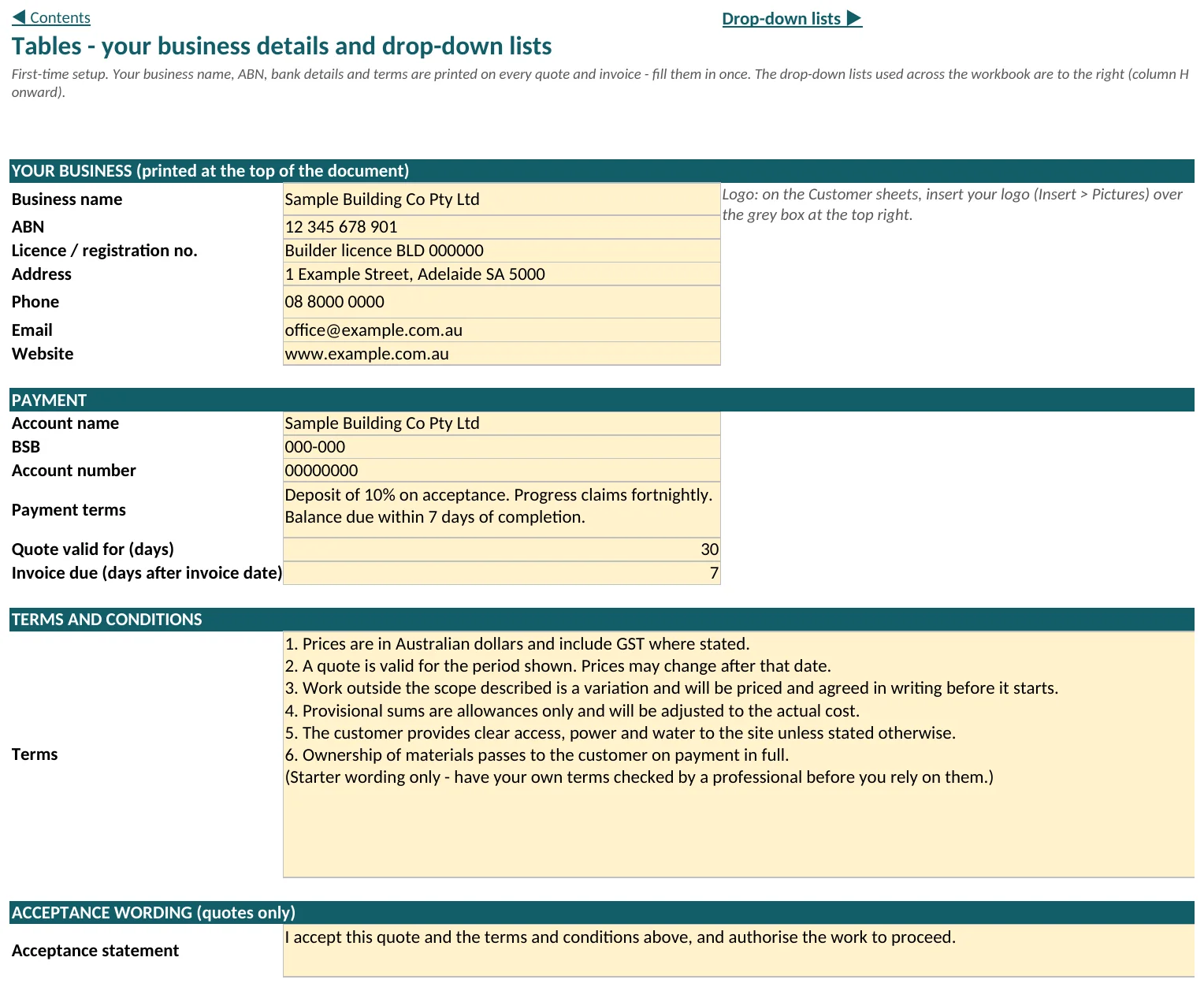
1. First time only: your business and your rates
Start on the Tables sheet. Everything you type here is used again on every job, so it is worth doing carefully once.
- Tables: your business name, ABN, bank details, payment terms, terms and conditions and the acceptance wording, printed on every document
- Schedule of Margins: overhead, contingency and profit percentages by cost type, and the GST rate
- Labour Rates, Material, Other Direct Cost and Subcontractors: your rates, entered once, GST exclusive, with the year each was sourced
2. Set up the job
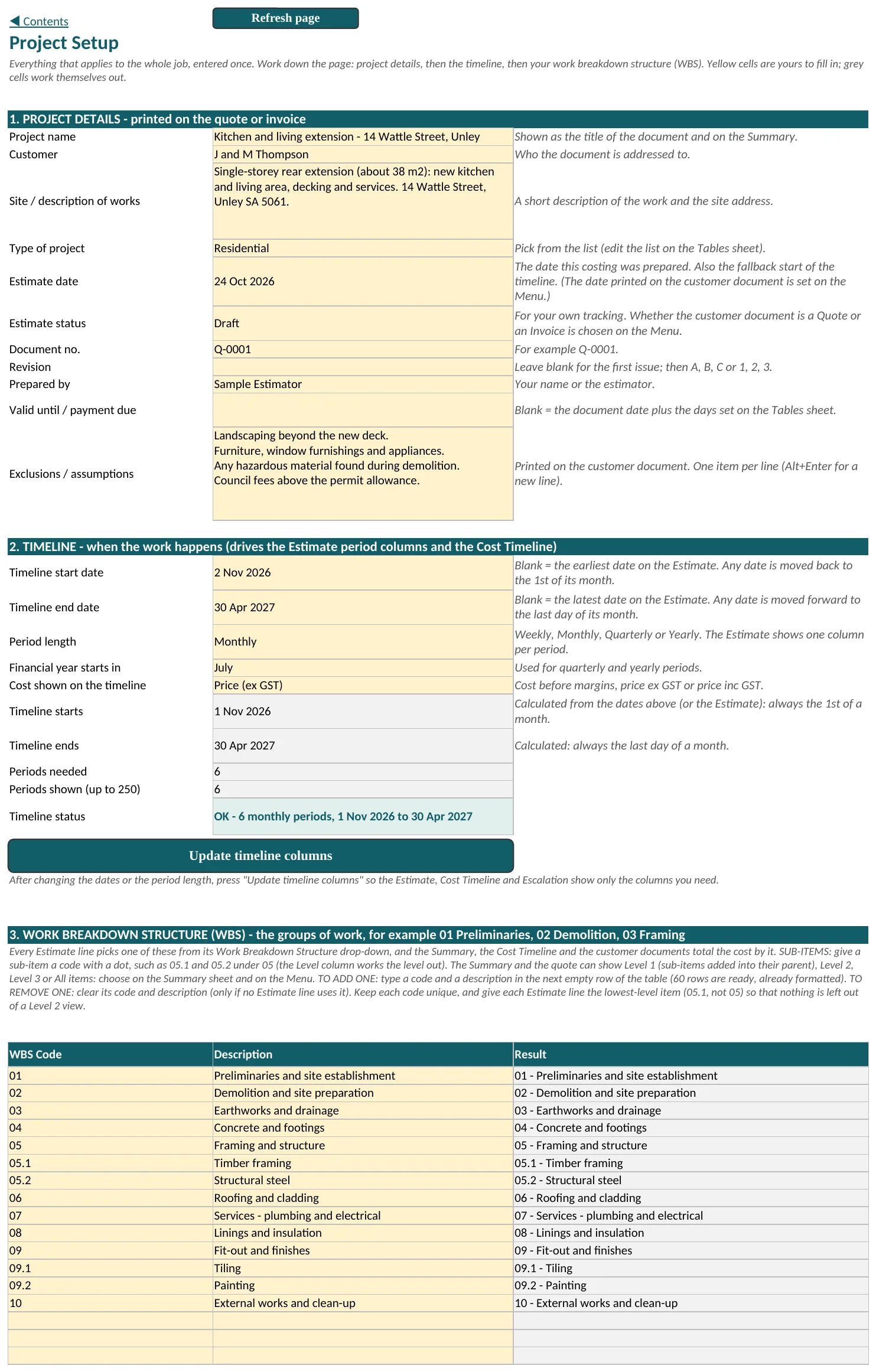
Project Setup is the one place for everything that applies to the whole job. Work down the page: project details, then the timeline, then the Work Breakdown Structure.
- Project, customer, site and document number, printed on the quote or invoice
- Timeline start and end, with weekly, monthly, quarterly or yearly periods
- Work Breakdown Structure (WBS): your own groups of work, with sub-items, in the order you want them printed
- Exclusions and assumptions, one per line, printed on the customer document
3. Price every line from your own rates
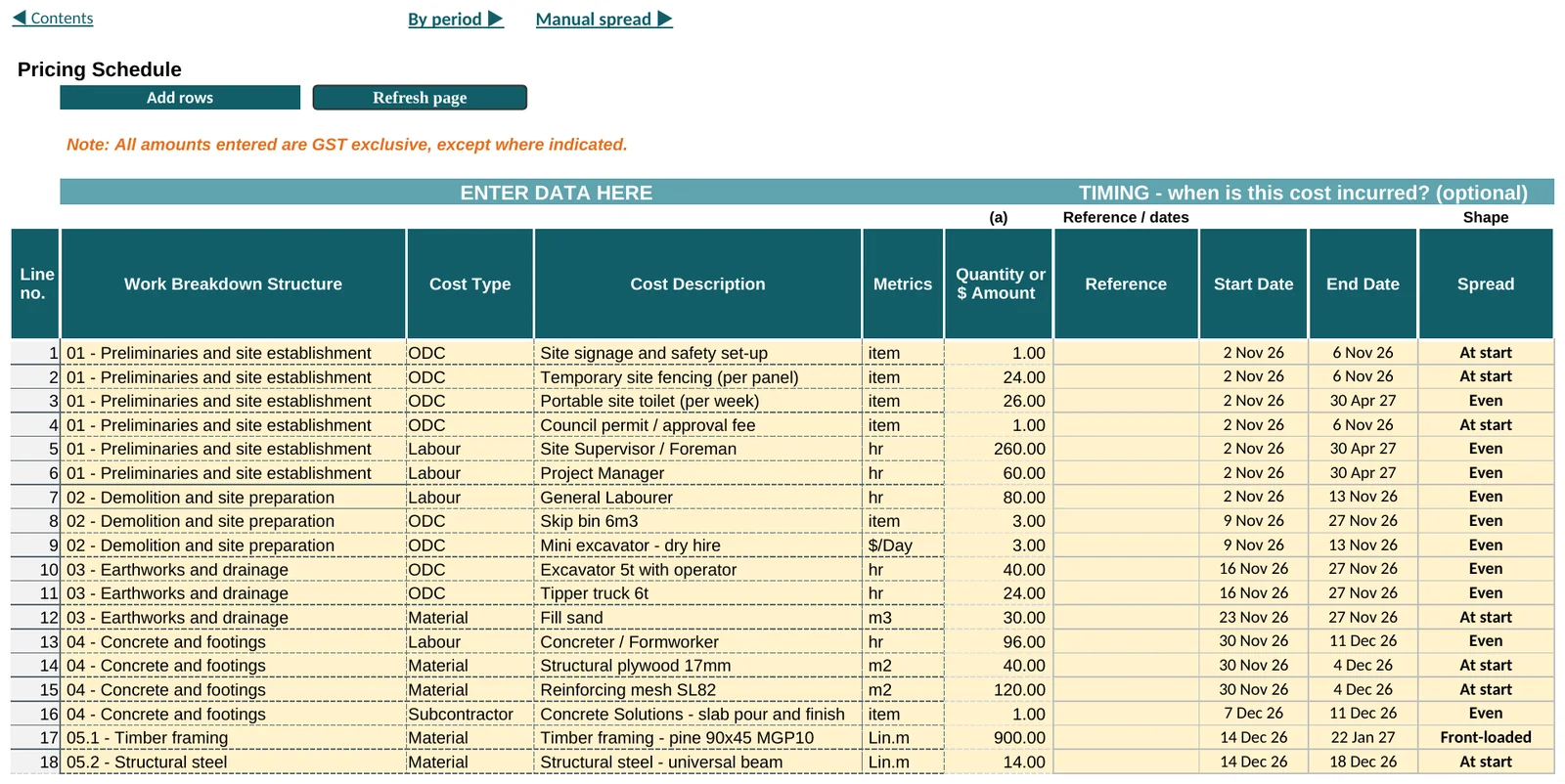
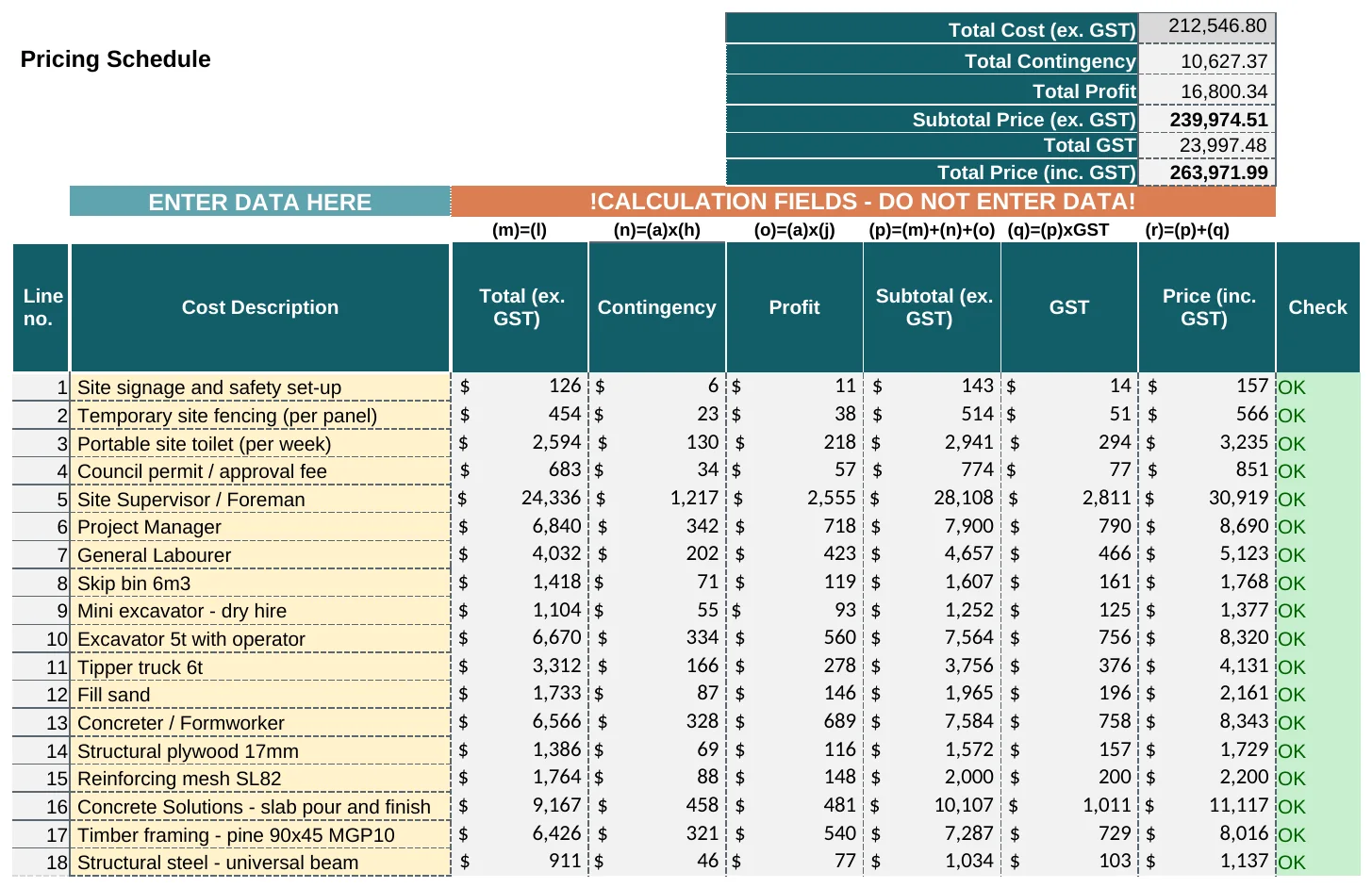
On Estimate 1, go to the next empty row and pick the Work Breakdown Structure item and the Cost Type. Choose the Cost Description and its Metrics (the unit), then enter the Quantity or $ Amount. The workbook looks up your rate and works out the rest.
- Only units that have a rate for the item you picked are offered
- Overheads, contingency, profit and GST come from your Schedule of Margins
- A Check column says OK, or the first thing to fix on that line, and a status box at the top says All lines OK before you send anything
- 186 lines to start with. Press Add rows and type how many more you need, up to 2,000 at a time
- Empty rows are hidden, so the sheet is only as long as your job. A few spare rows stay open and more appear as you type in the last one. Refresh page tidies the page, and Show all rows on the Menu brings every row back
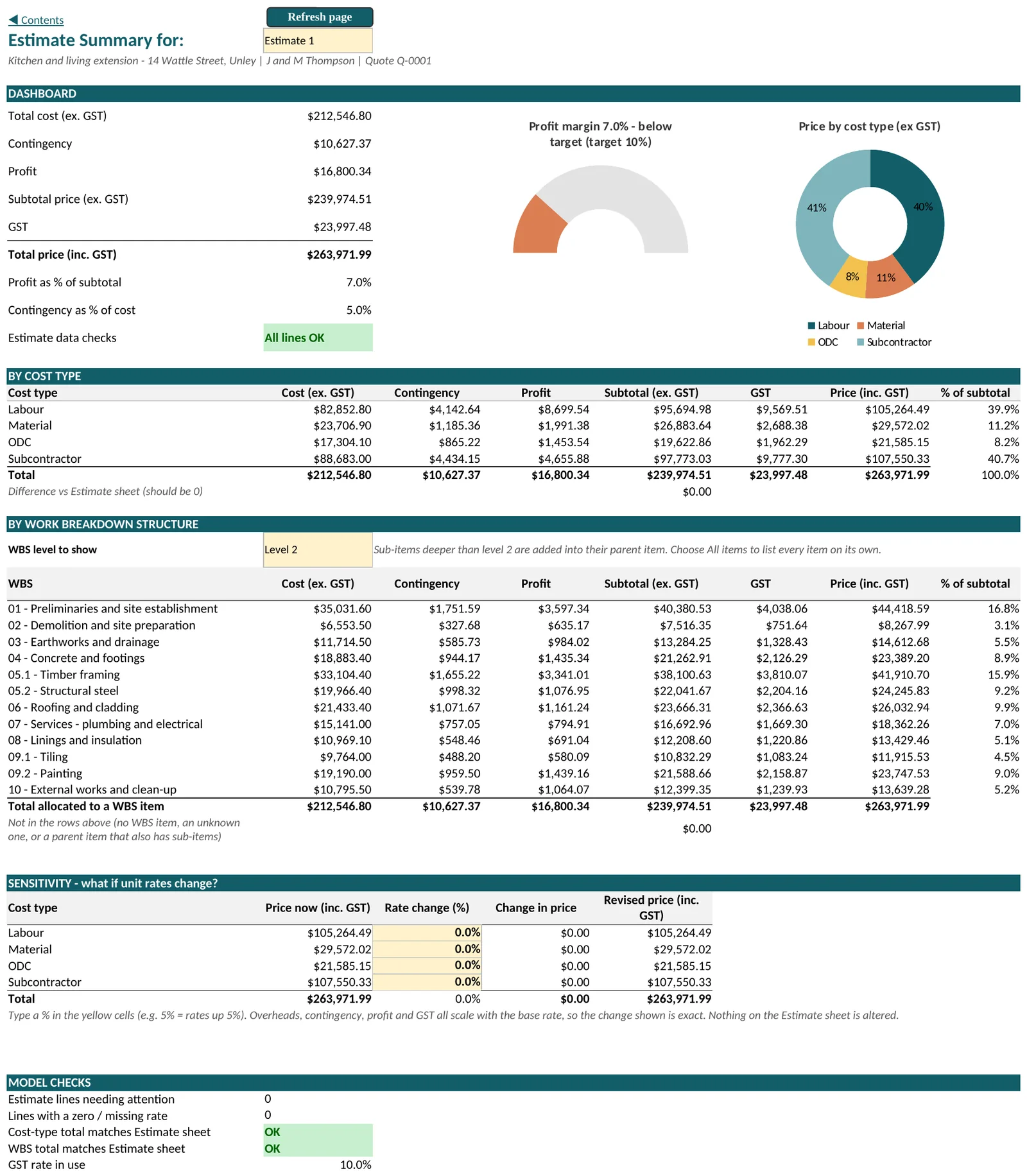
4. See the price and the margins
Summary reads the Estimate you choose. It shows the totals, the profit margin against your target, and the price by cost type and by work breakdown item.
- Choose how much WBS detail to show, from Level 1 down to every sub-item
- A sensitivity block shows the revised price if rates rise by a percentage you type
- Model checks confirm the totals agree with the Estimate before you send a document
- Summary and Cost Timeline each read the Estimate you choose, separate from the one you print
5. See when the money is spent
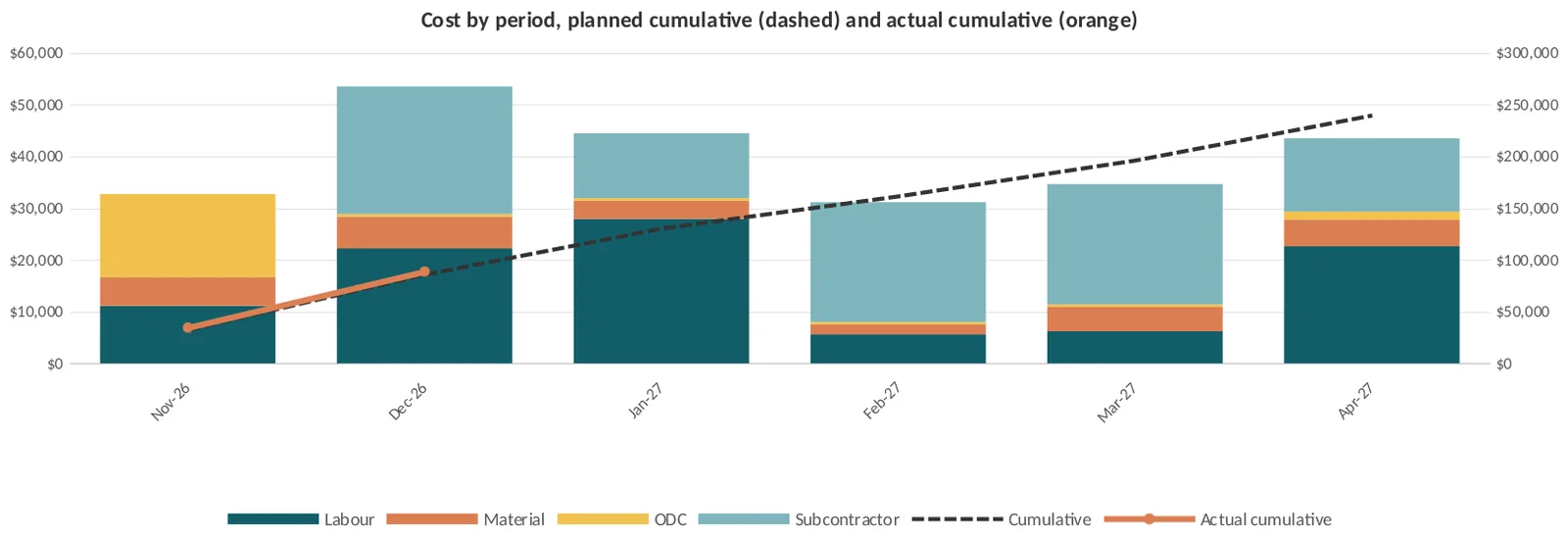
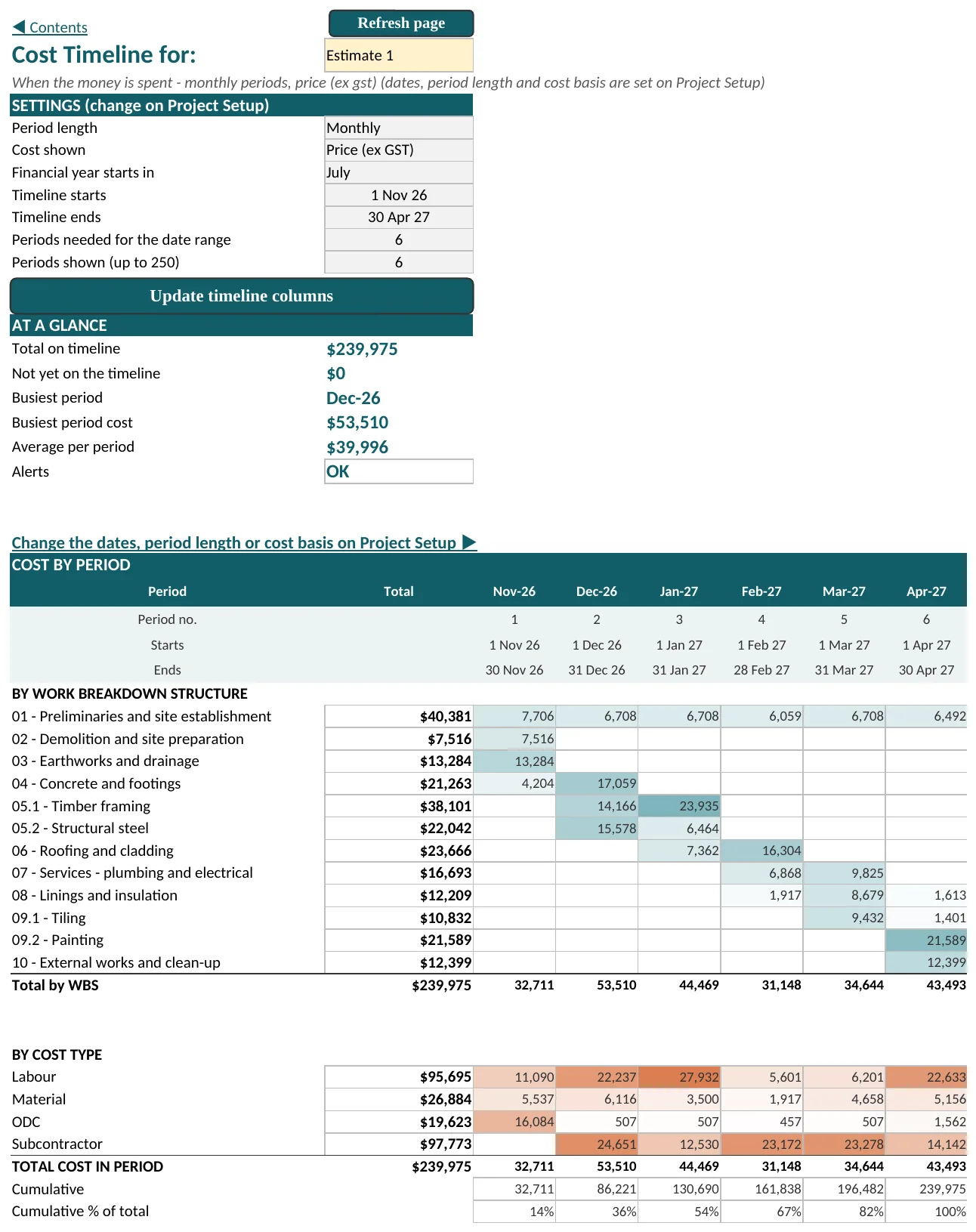
Give each line a start date, an end date and a shape. The Cost Timeline shows the spend by period, by work breakdown item and by cost type, with cumulative totals and a chart.
- Spread shapes: even, front-loaded, back-loaded, S-curve, at start, at end, or type your own
- Type actual costs into each period as the job runs
- See actual cost to date against the plan, and the over or under spend
- Up to 250 periods, weekly, monthly, quarterly or yearly
Allow for price rises
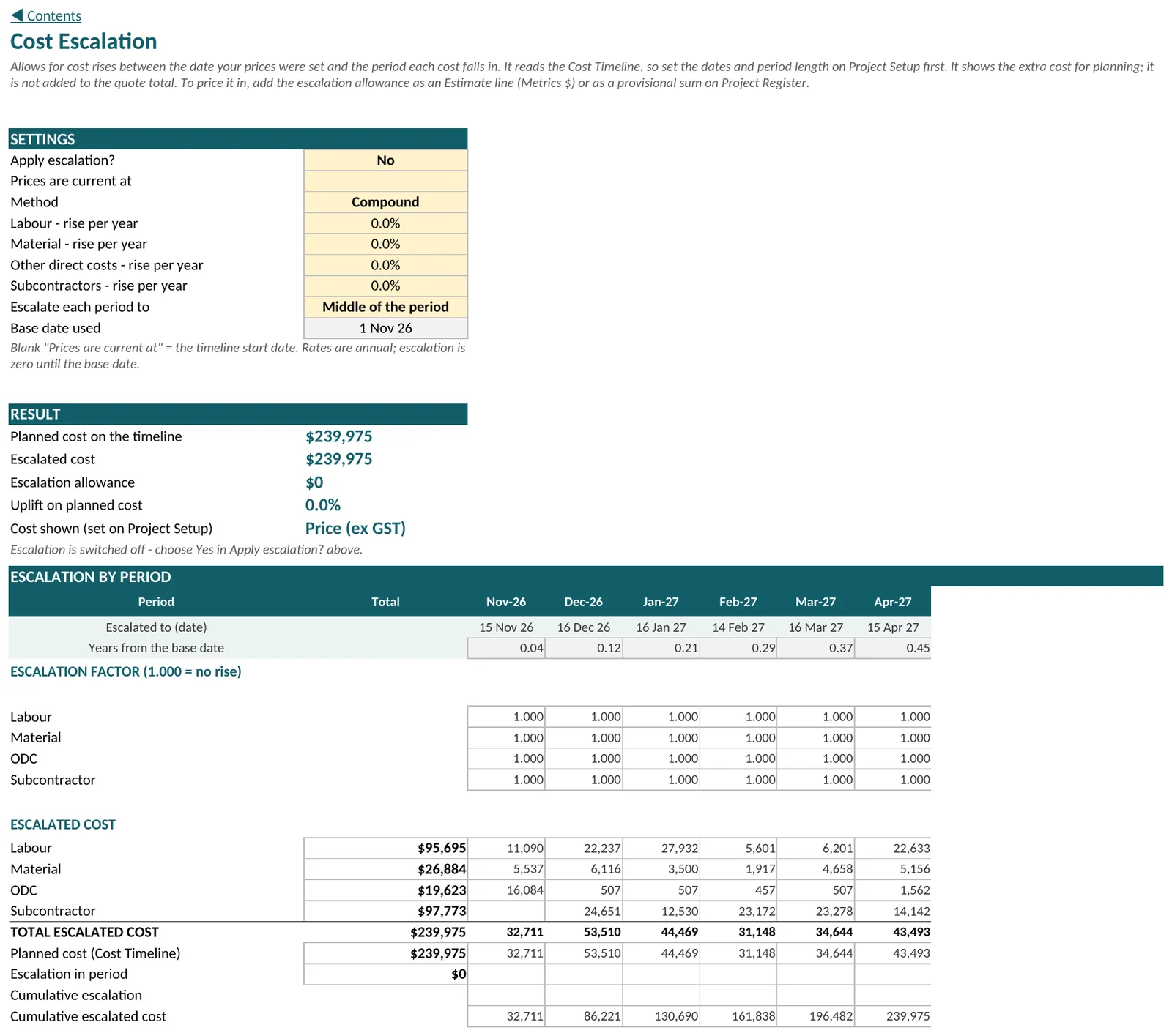
Prices set today are not the prices you pay in month nine. The Escalation sheet shows the extra cost of price rises between the date your rates were set and the period each cost falls in.
- A yearly rise for labour, material, other direct costs and subcontractors, compound or simple
- Escalate each period to its start, middle or end
- It shows the extra cost for planning and does not change the quote total. To price it in, add the allowance as an Estimate line or as a provisional sum on the Project Register
6. Quote, invoice and variations
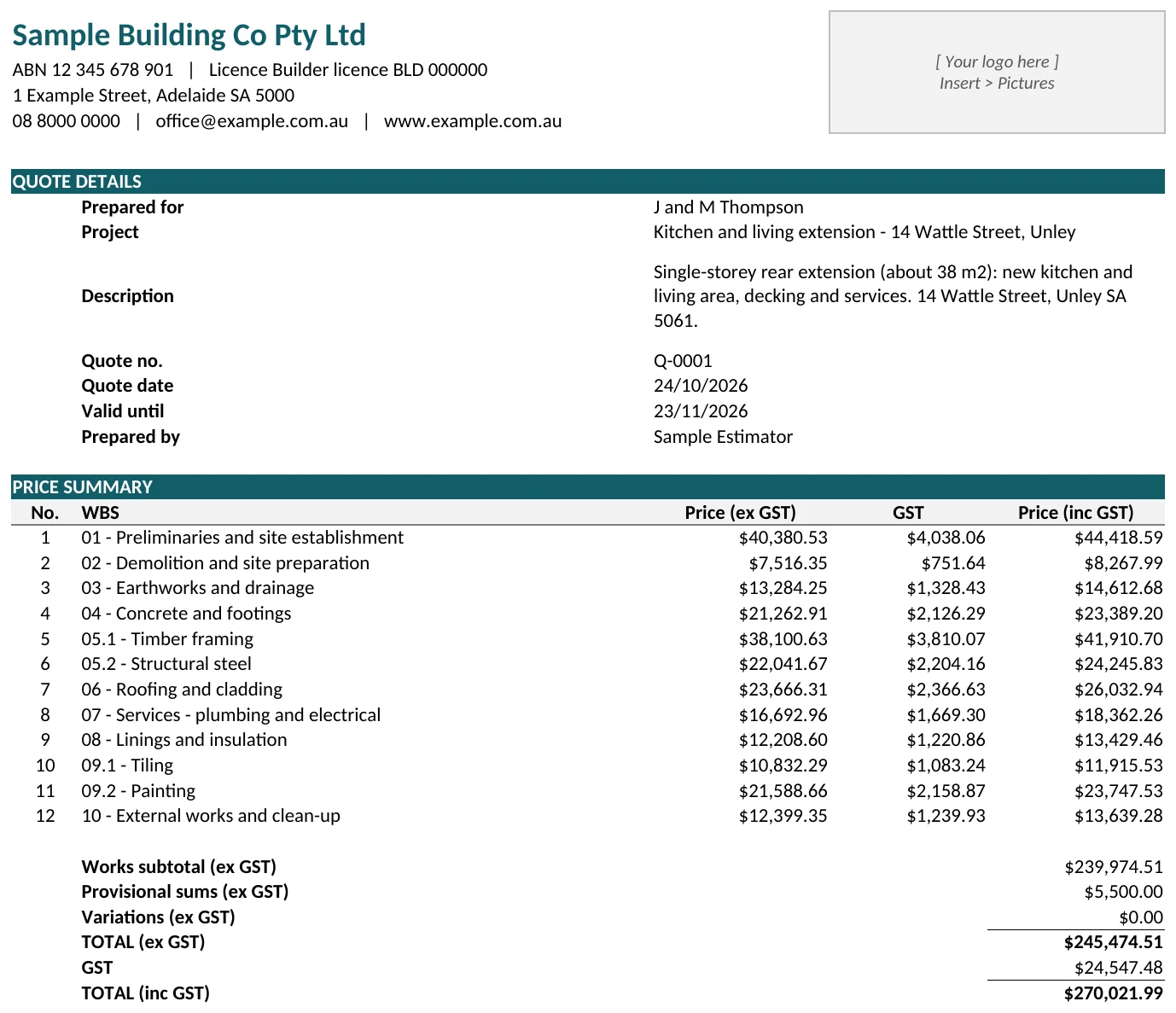
The Menu holds the choices for the document you send. You can issue the same estimate as a quote now and as an invoice later, without touching the costing.
- Quote or invoice. A quote shows how long it is valid and the acceptance wording. An invoice shows when payment is due
- Customer Summary: price by work breakdown item, payment details, terms and a signature line
- Customer Detailed: a schedule of works listing every line with unit price and amount
- Variations: none, one, all approved itemised, or all approved combined
- Save as PDF from the Menu. Excel asks where to save and names the file for you
Variations, extra Estimates and the record of the job
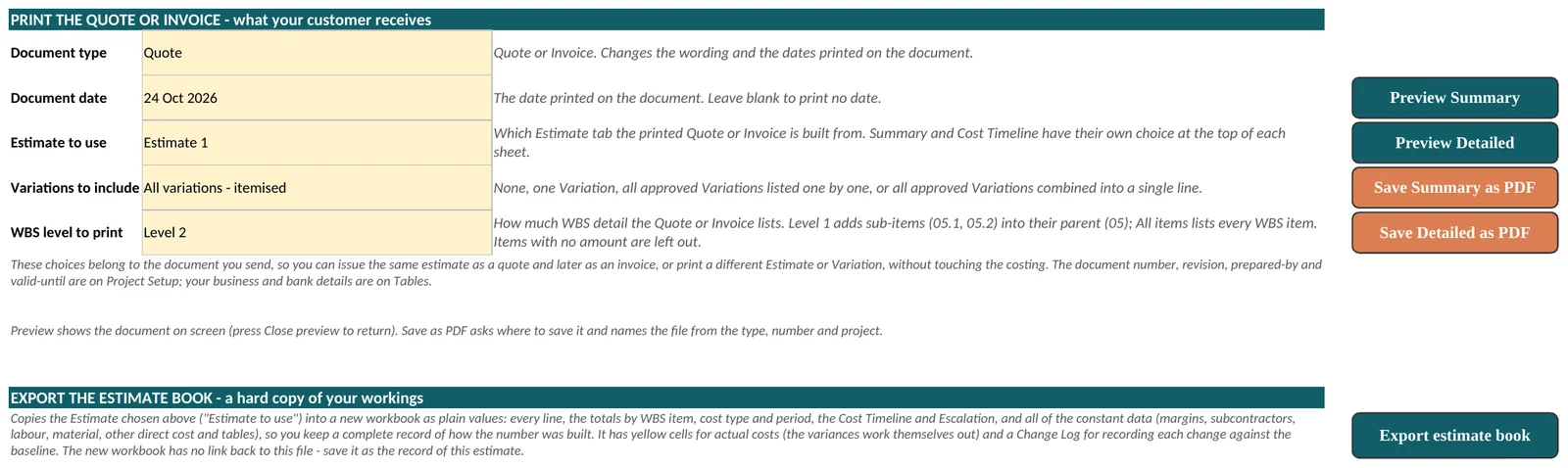
Add up to 8 Variation tabs and 8 extra Estimate tabs from the Menu. Copy the lines of an existing Estimate or start from an empty sheet. Show or hide tabs without losing their data. The Menu shows when each tab was last edited.
- Record each Variation's status on the Project Register: Draft, Quoted, Approved or Declined
- Provisional sums, up to 5, are always included in the total
- A revision history where you record each issue, with the change in total from the one before
- Export estimate book copies the finished estimate and all its workings into a new workbook of plain values, as a record of how the number was built
What is in the workbook
Tab colours group the sheets, and every sheet has a link back to Contents.
| Sheet | What it holds |
|---|---|
| Contents, Menu | Start here, show or hide tabs, add Variations and Estimates, print and save PDFs, export the estimate book. |
| Tables | Your business details, payment terms, terms and conditions, acceptance wording and the drop-down lists. Fill this in first. |
| Project Setup, Estimate 1, Summary, Cost Timeline, Escalation | The job itself. |
| Project Register | Provisional sums, Variation status, a note on each Estimate and the revision history. |
| Customer Summary, Customer Detailed | The documents your customer receives. They stay hidden until you press Preview on the Menu. |
| Schedule of Margins | Overhead, contingency, indirect overhead and profit percentages by cost type, and the GST rate. |
| Labour Rates, Material, Other Direct Cost, Subcontractors | Your rates, entered once, GST exclusive, with the year each was sourced. |
The rates and margins supplied are samples only. Replace them with your own before you quote. Every amount is in Australian dollars and excludes GST unless the sheet says otherwise.
What you need
Windows desktop Excel: Microsoft 365 or Excel 2024. Keep the file as an .xlsm, because the buttons are macros.
The first time you open it, Windows may block the macros in a downloaded file. The guide to opening your workbooks shows how to unblock it in about a minute.
You also get a blank copy with the sample job removed, so you can start your first real job straight away.
Before you buy
- Mac and Excel on the web are not supported
- No mobile app, and no two people editing at the same time
- No links to accounting software
- It prices work from the rates you enter. It does not measure drawings or take quantities off plans
Quote your next job with it
Costright Estimate is $495 once. Add Costright Risk when a job needs a contingency you can defend.